spiritvale-plugin-discordrpc
Discord RPC
v0.1.2 · 12.0 KB · 134 downloads · Updated Aug 26, 2026
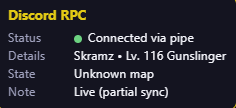
Shows Discord Rich Presence while you play SpiritVale: character name, level, class, and map. Requires Discord desktop and Capture running in Plugin Manager. Requirements - SpiritVale Plugin Manager 1.1.8+ from https://www.spiritvalemods.com - Npcap with WinPcap API-compatible mode enabled (https://npcap.com/#download) Install with Plugin Manager 1. Install Npcap and Plugin Manager first. 2. On this mod page, click Install with Plugin Manager (or use the Catalog tab inside the manager). 3. Confirm the browser opens Plugin Manager, then enable the plugin. Install the zip manually 1. Click Download zip on this page. 2. Open Plugin Manager, go to Plugins, and choose Import zip. 3. Enable the plugin in the list if it is not already on. Tips - Recommend you open your plugins before selecting a server for best results. Packet sniffing is touchy. - Keep Discord desktop open. This plugin does not need a visible HUD to update presence. - Unlock HUDs (F2) if you want to show or drag the small status overlay.
Install with Plugin Manager requires SpiritVale Plugin Manager. Your browser will ask to open the app, then the zip is added to your library.
Screenshots
Files
| Version | Size | Published | Changelog | |
|---|---|---|---|---|
| v0.1.2 | 12.0 KB | Aug 26, 2026 | Map presence works with Plugin Manager 1.1.8+. Ignores corrupted placeholder character names. | Download |
| v0.1.1 | 11.9 KB | Aug 26, 2026 | HUD scale and hide chrome (Unlock HUDs). Requires Plugin Manager 1.1.6. | Download |
| v0.1.0 | 10.9 KB | Aug 25, 2026 | Discord Rich Presence for SpiritVale Plugin Manager. Map names are currently broken. | Download |