spiritvale-plugin-dps-meter
DPS Meter
v0.2.7 · 12.7 KB · 454 downloads · Updated Aug 26, 2026
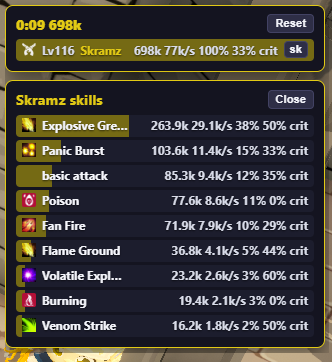
HUD DPS meter for SpiritVale. Shows encounter damage, share bars, and optional skill breakdown from passive packet capture. Requirements - SpiritVale Plugin Manager from https://www.spiritvalemods.com - Npcap with WinPcap API-compatible mode enabled (https://npcap.com/#download) Install with Plugin Manager 1. Install Npcap and Plugin Manager first. 2. On this mod page, click Install with Plugin Manager (or use the Catalog tab inside the manager). 3. Confirm the browser opens Plugin Manager, then enable the plugin. Install the zip manually 1. Click Download zip on this page. 2. Open Plugin Manager, go to Plugins, and choose Import zip. 3. Enable the plugin in the list if it is not already on. Tips - Unlock HUDs (F2) to drag the meter. Settings on the plugin row opens options. - Ctrl+R resets the encounter.
Install with Plugin Manager requires SpiritVale Plugin Manager. Your browser will ask to open the app, then the zip is added to your library.
Screenshots
Files
| Version | Size | Published | Changelog | |
|---|---|---|---|---|
| v0.2.7 | 12.7 KB | Aug 26, 2026 | HUD scale and hide chrome (Unlock HUDs). Requires Plugin Manager 1.1.6. | Download |
| v0.2.6 | 12.5 KB | Aug 26, 2026 | Per-plugin HUD scale when HUDs are unlocked. Requires Plugin Manager 1.1.5. | Download |
| v0.2.5 | 11.7 KB | Aug 25, 2026 | HUD DPS meter for SpiritVale Plugin Manager. Encounter timer, damage share, and skill breakdown. | Download |